
Schoolway LogoSchoolway
School Operating System — Security Module

Campus security, on lock.

QR-verified pickups. Digital visitor logs. One-tap emergency alerts. SchoolWay gives you complete control over who enters, who leaves, and who gets notified.

3 powerful tools2-second gate verification • 100% digital audit trail

100%
Digital audit trail for every pickup
2 sec
Average gate verification time
0
Lost paper logs
Instant
SOS alert delivery
Complete feature breakdown

Everything in campus security

Three tools that create a complete safety net for your students and staff.

Feature 1

QR & OTP Gate Pass Pickup Verification

"Secure, OTP-Verified Student Pickups."

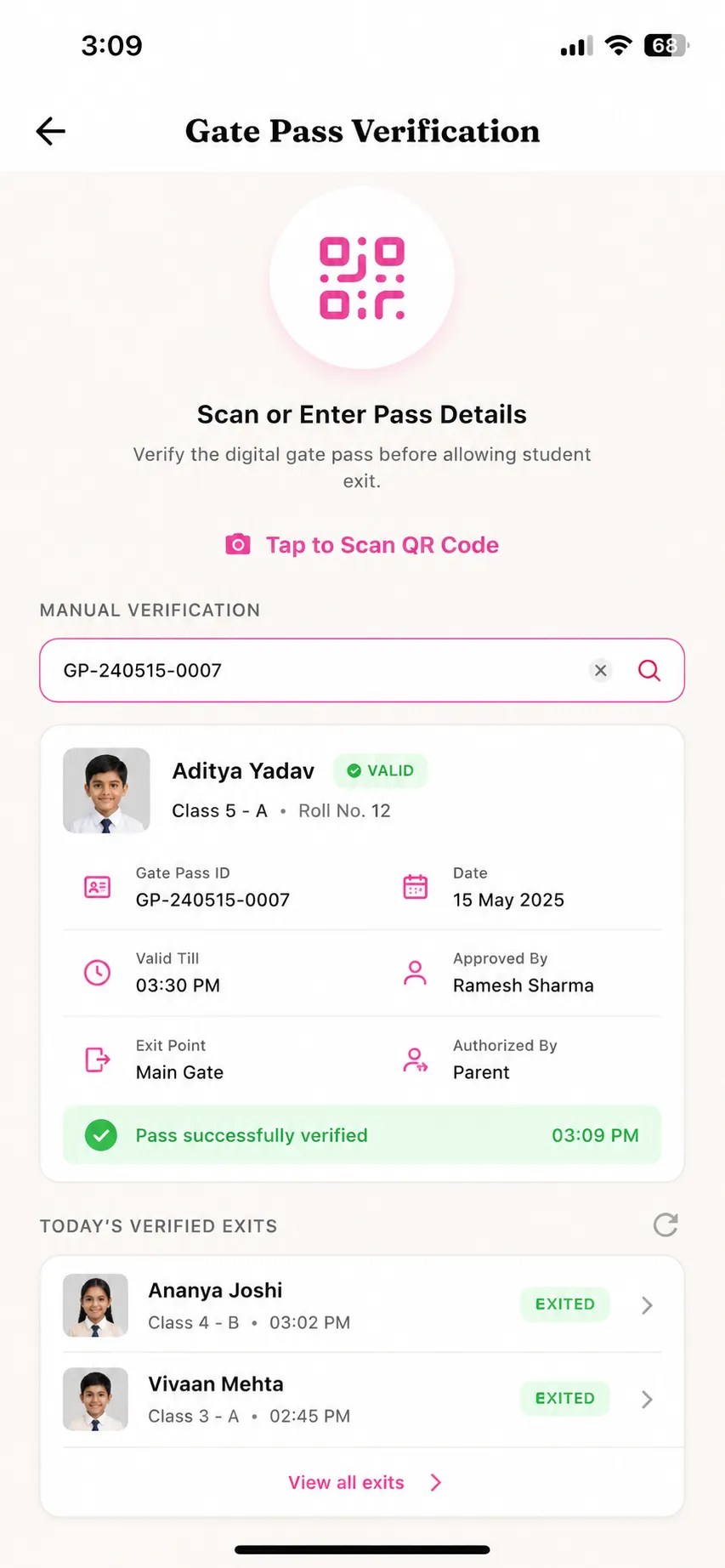
Parents request an early pickup pass in the app. Once approved, the app generates a secure QR code and 6-digit OTP. Security guards verify these at the gate — creating an immutable audit trail of every departure.

Key benefits
Ensures students are only released to authorized guardians
Creates a tamper-proof audit trail of all departures
Guard matches photo ID and QR/OTP before releasing student
Parent receives instant notification when child is released
Problem solved: No more risk of unauthorized student pickups with no verification system
ParentGuardAdmin
SchoolWay QR and OTP gate pass showing secure student pickup verification
Feature 2

Campus Visitor Logbook

"A Smart, Digital Front Gate Registry."

A digital check-in log for campus visitors. Guards record name, phone, photo, ID type, vehicle number, and the staff member they came to meet. Replaces handwritten paper guest books.

Key benefits
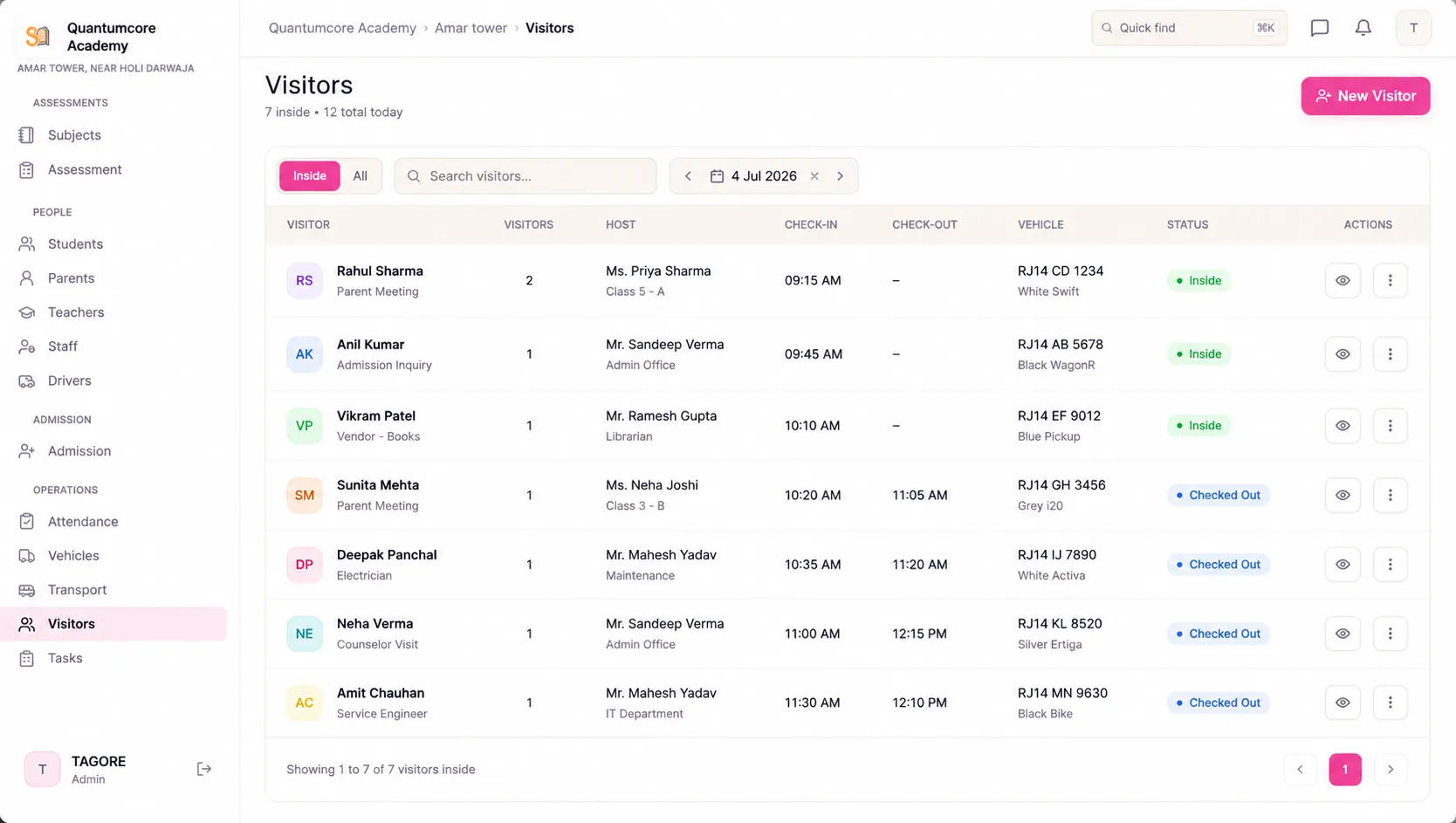
Replaces paper guest books with searchable digital records
Know exactly who is on campus at any time
Quick check-in with photo and ID capture
Instantly notify the host staff member of visitor arrival
Problem solved: No more lost paper visitor logs with no way to search past entries
GuardStaff HostAdmin
admin.schoolway.in/visitors
SchoolWay campus visitor logbook showing digital check-in log with name, photo and ID details
Feature 3

Emergency SOS Alerts

"Instant Safety Notifications When Seconds Count."

An emergency button in the mobile app for staff. Activating it sends location details and alert notifications to all connected users — including admins and parents.

Key benefits

One-tap alert with GPS location sharing
Notifies all relevant personnel instantly
Coordinates quick response during emergencies
Available for teachers, drivers, and all staff
Problem solved: No more slow, manual emergency notification processes during critical situations
TeacherDriverStaffAdminParent
2:35SOS Alert
Emergency SOS
One-tap alert to all staff
Your Location
Main Building, Ground Floor
Alert Recipients
Admin (2)
Security (4)
Teachers (18)
First Responders (3)
Emergency Contacts
Dr. Mehta (Principal)+91 98765 43210
Security Desk+91 98765 43211
Nearby Hospital108
TAP TO SEND SOS
GPS location will be shared instantly

Frequently asked questions

Common questions about SchoolWay's security features.

How does the QR/OTP gate pass work?
Parent requests early pickup in the app. Principal approves. System generates a QR code and 6-digit OTP. Guard scans the QR or the parent enters the OTP on the guard's device. Photo ID is matched before the student is released.
Can the visitor logbook replace our paper register?
Yes. The digital visitor log captures name, phone, photo, ID type and number, vehicle number, and the person they're visiting. All records are searchable and exportable.
Who receives the SOS alert?
When SOS is activated, the alert with GPS location is sent to all connected admins, security personnel, and relevant staff. Parents are notified if the alert involves a student safety issue.
Is the gate pass system compliant with safety regulations?
Yes. The dual-key verification (QR + OTP), photo ID matching, and complete audit trail exceed standard school safety compliance requirements.

Ready to make your campus more secure?

See how SchoolWay helps schools create a complete safety net for students.