
Schoolway LogoSchoolway
School Operating System — Academic Module

Academic management that works as hard as your teachers.

From drag-and-drop timetabling to print-ready report cards, SchoolWay automates the busywork so your faculty can focus on what matters — teaching.

6 powerful tools • Used by 200+ schoolsZero training required

85%
Less time on scheduling
Instant
Report card generation
100%
Digital record accuracy
0
Lost paper records
Complete feature breakdown

Everything in academic management

Six powerful tools that turn hours of administrative work into minutes.

Feature 1

Drag-and-Drop Timetable Builder

"Stress-Free Timetabling: Plan Your Term in Minutes."

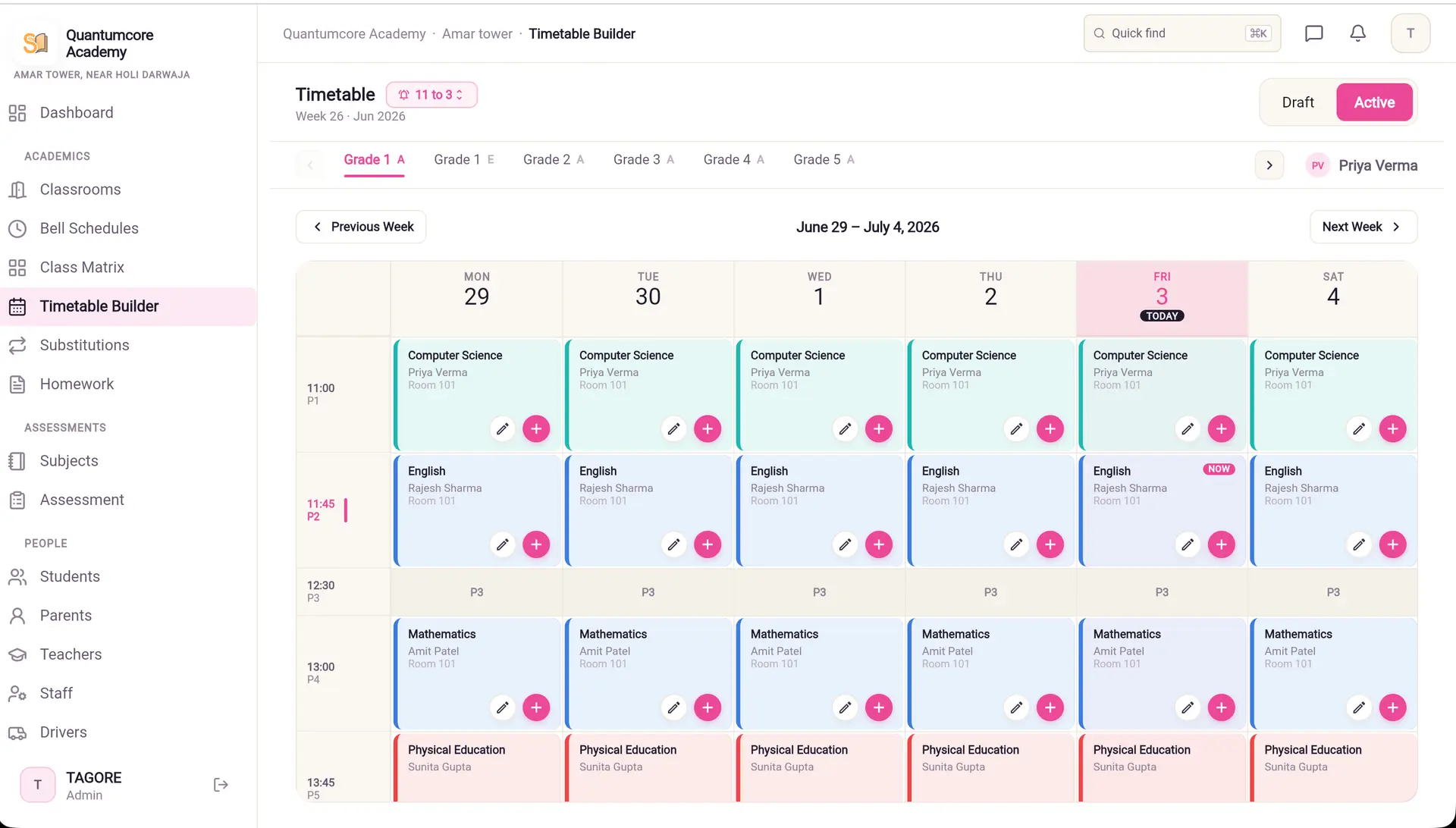
An interactive grid system that coordinates days of the week, academic periods, subjects, physical classrooms, and teacher rosters. It alerts coordinators immediately to booking clashes — like a teacher assigned to two places at once.

Key benefits
Saves academic coordinators days of scheduling work
Instant visual clash detection with green checkmarks
Supports complex rotation schedules and lab periods
Problem solved: No more manual grid drawing or spreadsheet scheduling
AdminCoordinator
admin.schoolway.in/timetable
SchoolWay drag-and-drop timetable builder showing periods, teachers and clash detection
Feature 2

Substitute Teacher Dispatch

"Seamless Classroom Coverage, Instantly."

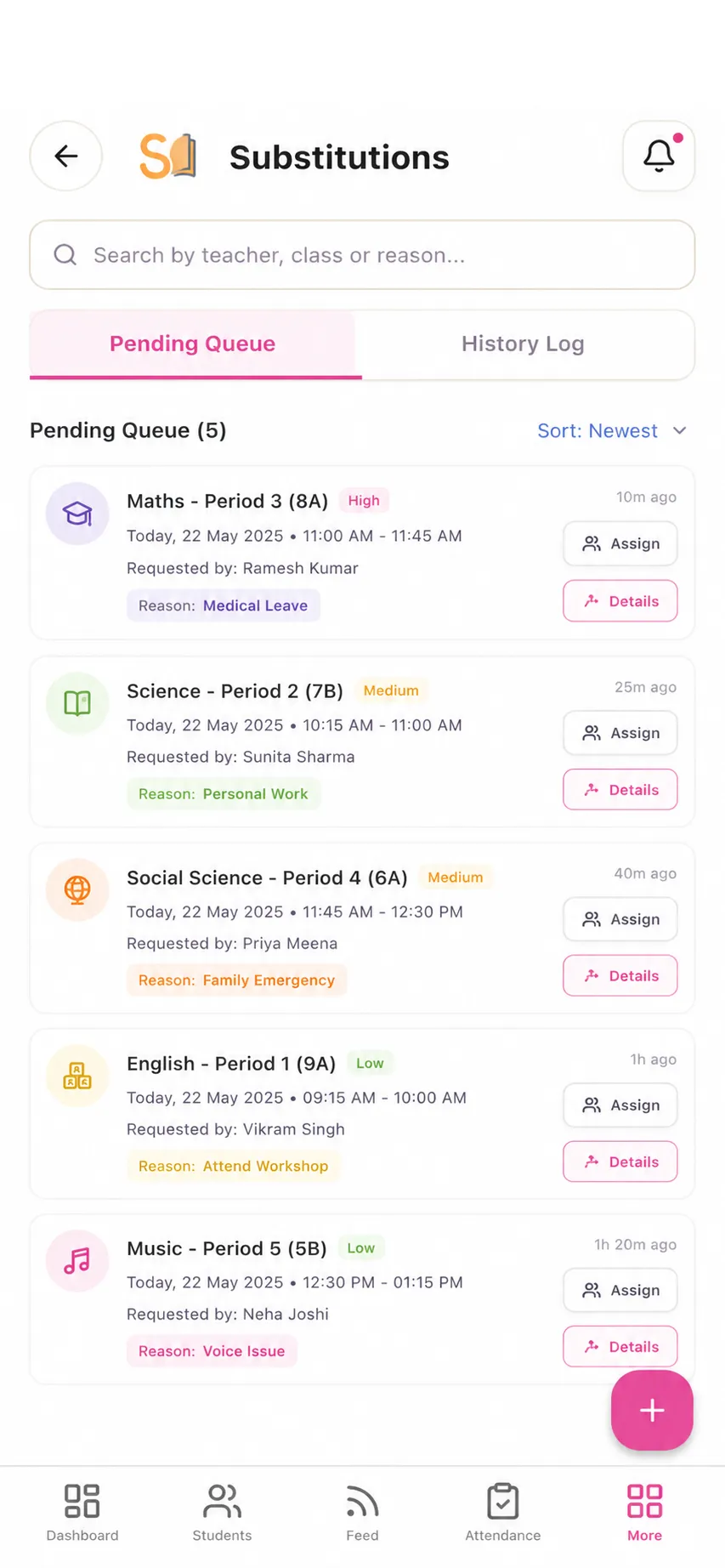
When a teacher is absent, SchoolWay automatically searches the daily grid to find available educators with matching subject knowledge and notifies them of their coverage assignments.

Key benefits
Prevents empty classrooms when teachers fall ill
Matches substitutes by subject expertise
Instant push notification to available teachers
Problem solved: No more last-minute phone calls to find substitute teachers
CoordinatorTeacher
SchoolWay substitute teacher dispatch showing available teachers matched by subject
Feature 3

Syllabus & Curriculum Mapper

"Clear Syllabus Mapping for Focused Learning."

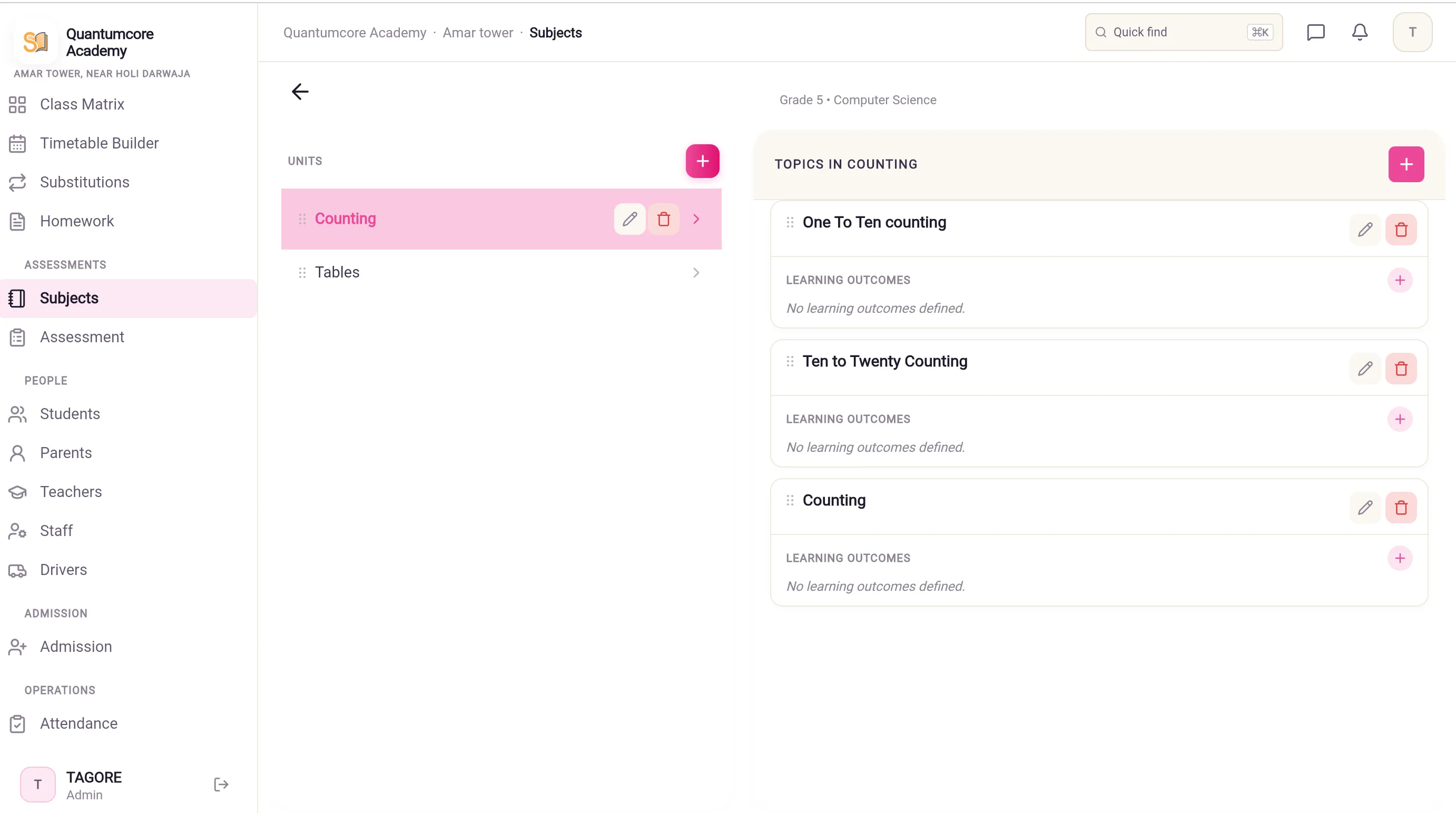
Organise subjects into unit layouts and specific learning objectives, mapping scheduled tests and homework to particular curriculum topics. Parents and students get clear direction on study topics before exam days.

Key benefits
Gives parents visibility into what's being taught
Students can track completed vs pending units
Homework and tests linked directly to curriculum topics
Problem solved: No more confusion about what was covered and what's coming up
CoordinatorTeacherParent
admin.schoolway.in/syllabus
SchoolWay syllabus and curriculum mapper showing units, topics and progress tracking
Feature 4

Digital Gradebook & Progress Tracker

"Ditch the Spreadsheets: Academic Grading Redefined."

A digital sheet where teachers record homework and exam scores with custom comments. It calculates class averages, top performers, and students who need extra support — automatically.

Key benefits

Replaces slow, error-prone paper gradebooks
Auto-calculated class averages and performance trends
Gives coordinators a school-wide view of academic health
Problem solved: No more manual grade calculation or lost paper records
TeacherAdmin
admin.schoolway.in/gradebook
Class 4-A Gradebook
Term 124 students
75%
Class Avg
98%
Top Score
83%
Pass Rate
3
Need Help
Aanya S.
A92
Arjun K.
A85
Diya P.
B+78
Kabir R.
C64
Mira S.
D45
Rohan G.
A88
Neha K.
B71
Vikram S.
C-56
Feature 5

Automated Report Card Generator

"Print-Ready Report Cards in Seconds."

Combines exam grades, homework scores, attendance records, and teacher remarks to build beautifully styled PDF report cards ready for distribution or printing.

Key benefits

Saves administrative staff weeks of calculation work
Styled, professional PDF output
Includes attendance, grades, and teacher remarks
Problem solved: No more manually calculating and formatting report cards for each student
AdminTeacherParent
admin.schoolway.in/reports
Report Cards • Term 1
Ready ✓24 cards
20
Generated
3
Pending
3
Template
Aanya S.A
Generated
Arjun K.A
Generated
Diya P.B+
Generated
Kabir R.C
Pending review
Mira S.D
Generated
Rohan G.-
Pending
Neha K.B
Generated
⬇ Download all (24 report cards as PDF)
Feature 6

Smart Academic Term Archiving

"Historical Academic Records, Always a Tap Away."

Separates all academic, grade, and attendance records by school year. Staff can switch between years with a single tap to view historical files — keeping current records clean while preserving every past term.

Key benefits

Keeps current dashboard clutter-free
Instant access to historical student data
Perfect for audits and transcript requests
Problem solved: No more digging through old files and cabinets for past records
AdminCoordinator
admin.schoolway.in/archive
Academic Archive
72 records2024-25
2026-27
2025-26
2024-25
2023-24
2022-23
3
Terms
24
Students
72
Documents
Term 1Apr-Jun 2024
24 students
Term 2Jul-Sep 2024
24 students
Term 3Oct-Dec 2024
24 students
Annual ExamJan-Mar 2025
24 students
Summer SchoolMay-Jun 2024
12 students

How academic management works

From setting up the timetable to generating final report cards — the entire workflow in one seamless system.

01

Set up your term

Create the timetable, map the syllabus, and configure gradebook settings before the term starts. All in one place.

02

Run classes seamlessly

Mark attendance in seconds, record grades as you go, and auto-dispatch substitutes when teachers are absent.

03

Generate reports instantly

At term end, generate styled report cards, archive academic records, and share results with parents digitally.

Designed for every role

Who benefits from academic management?

Academic Coordinators

  • Build timetables in minutes instead of days
  • Auto-assign substitutes when teachers are absent
  • Monitor curriculum progress across all classes

Teachers

  • Mark attendance with one tap
  • Record grades and homework digitally
  • Generate report cards without manual calculations

Parents & Students

  • Track syllabus progress in real time
  • View grades and exam schedules
  • Download report cards instantly

Frequently asked questions

Common questions about SchoolWay's academic management features.

Can I build complex timetables with rotating periods?
Yes. The drag-and-drop builder supports multi-week rotation cycles, lab periods, break times, and teacher availability constraints. Clashes are flagged in real time so you resolve them before publishing.
What happens when a teacher calls in sick?
The substitute dispatch system scans available teachers with matching subject expertise and sends them a notification. The coordinator can review and approve before the assignment is confirmed.
Can parents see the syllabus and curriculum?
Yes. Parents can view the syllabus mapped to their child's class, see which units have been completed, what's coming up, and what topics upcoming tests will cover. No more guessing what to study.
How are report cards generated?
The system combines exam scores, homework grades, attendance data, and teacher remarks into a styled PDF. You can preview, edit, and download individual cards or batch-print the entire class.
Can I access last year's academic records?
Yes. Terms are automatically archived and accessible with a single tap in the dropdown. Switch between academic years to view historical grades, attendance, and reports instantly.

Ready to simplify your academic operations?

Streamline scheduling, grading, and reporting with SchoolWay.